
Sleepwrist vs SleepWatch
SleepWatch is a popular free sleep tracker for iPhone and Apple Watch with snoring recording. Here is how the SleepWatch app compares with Sleepwrist in 2026.
SleepWatch is one of the most popular sleep trackers on the App Store: free to start, it works with your Apple Watch or with your iPhone at your bedside, and adds snoring recording, a smart alarm and white noise. Sleepwrist is a newer, sleep-only app for iPhone and Apple Watch, built for women over 40 who keep waking at night and want to understand why, in plain words. Pick SleepWatch for an all-round tracker with sounds and alarms; pick Sleepwrist if night wake-ups are your main problem.
We make Sleepwrist, so we have stuck to facts we could check. Everything about SleepWatch comes from its App Store listing and official website, as of October 2026.
At a glance
| Sleepwrist | SleepWatch | |
|---|---|---|
| Main focus | Night wake-ups and what causes them | All-round sleep tracking and coaching |
| Made for | Women 40+ who sleep badly, new to health data | A broad audience, including people curious about snoring |
| How it tracks | Reads the sleep your Apple Watch records in Apple Health | Apple Watch on your wrist, or iPhone at your bedside |
| Snoring and sound recording | No | Yes |
| Smart alarm | No | Yes (Premium) |
| White noise | No | Yes |
| Wrist temperature vs your usual nights | Yes (Series 8 or later, and Ultra) | Not described in its listing or website |
| Daily "how do you feel" log | Yes, a mood check-in | Yes, a daily sleep log |
| Platforms | iPhone and Apple Watch | iPhone, Apple Watch, and Android (per its website) |
| Price model | Subscription (yearly with free trial, or monthly) | Free, with SleepWatch Premium |
| App Store rating (Oct 2026) | New, not rated yet | 4.7 from about 328K ratings |
| Last update (Oct 2026) | Actively developed | July 24, 2026 (version 8.7.4) |
Features and prices change, so check the App Store before you decide.
What is the SleepWatch app?
SleepWatch is made by Bodymatter, Inc. and has been on the App Store since 2016. Its listing describes an all-in-one sleep tracker and digital sleep coach. On iPhone, you can either place your phone by the bed and start the app, or wear your Apple Watch to bed for automatic tracking. Bodymatter suggests trying both for the fullest picture.
According to its listing and website, the SleepWatch app gives you:
- A morning sleep report with total sleep, restful sleep and sleep disruptions, on your phone or watch.
- Heart data during sleep, including sleeping heart rate and "heart rate dip" (how much your heart rate slows at night), plus sleeping HRV (heart rate variability) and blood oxygen.
- Sleep rhythm, which shows how consistently you go to bed and wake up at the same time.
- Sound recording of snoring, coughing and other noises, with snore levels from minimal to heavy.
- A smart alarm and bedtime suggestion, designed to wake you in a lighter stage.
- A white noise library you can mix.
- AI-powered coaching tips to improve your habits.
- A daily sleep log of how rested, energized or fatigued you feel, and activity tags to see what affects your nights.
Is SleepWatch free?
Yes, the SleepWatch app is free to download, with a Premium Membership for extra features. Its App Store description quotes $4.99 a month or $39.99 a year, and the listing also shows other monthly and yearly price points plus a one-time "Sleep Report Card", as of October 2026. Several features, including personalized coaching, the smart alarm and parts of the sleep report, are marked as Premium in the description.
Where SleepWatch is strong
- Huge user base. About 328K ratings with a 4.7 average, the most of any sleep app we reviewed for our best sleep apps for Apple Watch roundup.
- Flexible tracking. It works with or without a watch, which helps on nights your Apple Watch is charging.
- Snoring and sounds. If you or your partner wonder about snoring, recording it is genuinely useful.
- A smart alarm and white noise in the same app.
- A real free tier to get started.
- A "how do you feel" log, a smart idea that Sleepwrist shares.
- A clean privacy label. On its App Store page, no data is listed as used to track you.
Waking up at night: which app helps more?
If your main frustration is the 3 AM wake-up, the night sweats or feeling drained after what looked like a full night, the question is less "how long did I sleep?" and more "what keeps waking me up?". The Sleep Foundation reports that up to 46% of people have sleep difficulties in the years before menopause, often linked to hot flashes and night sweats.
SleepWatch tracks disruptions and gives tips to reduce them. Sleepwrist is built entirely around that question: it marks every wake-up, finds the hour you wake up most, and checks whether your wake-ups line up with warmer nights or a higher heart rate. Our guide on why you wake up at 3 AM explains the usual causes.
Where Sleepwrist is different
Sleepwrist reads the sleep your Apple Watch already records, including Apple's own sleep stages. There is nothing else to set up each night and no account to create.
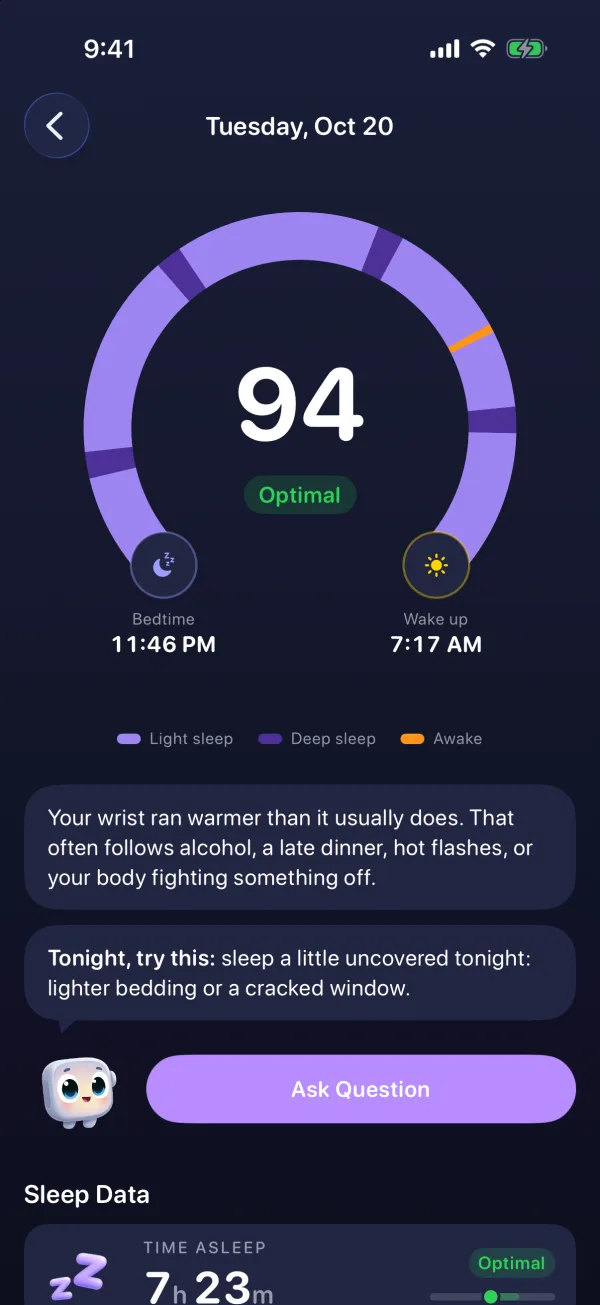
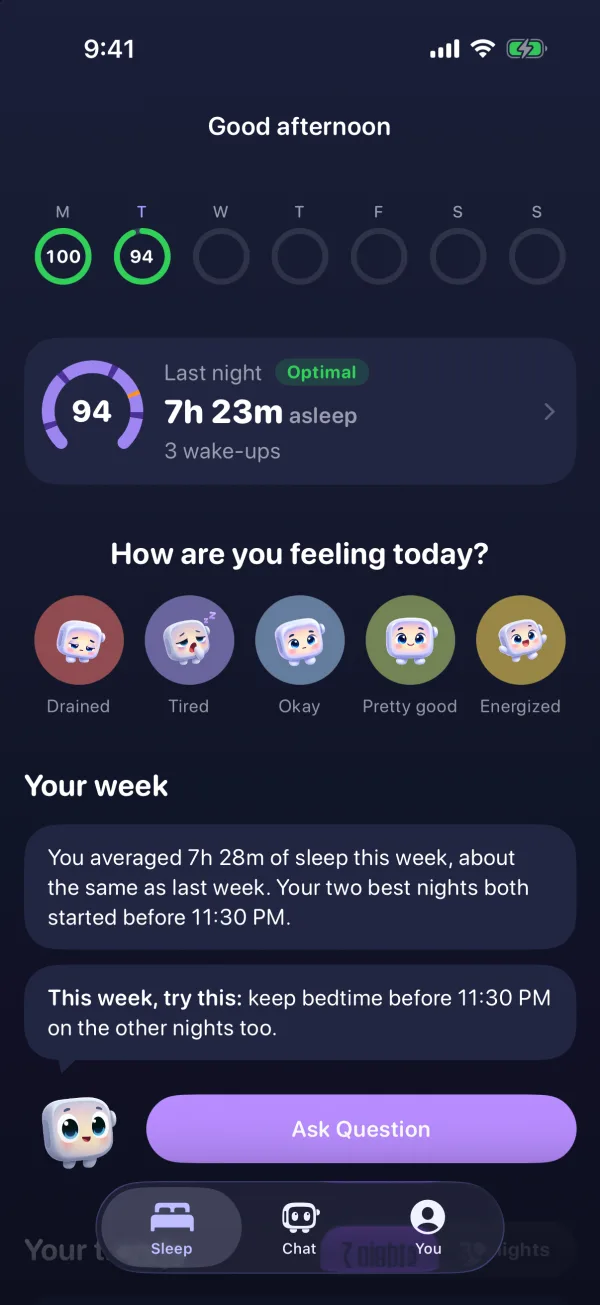
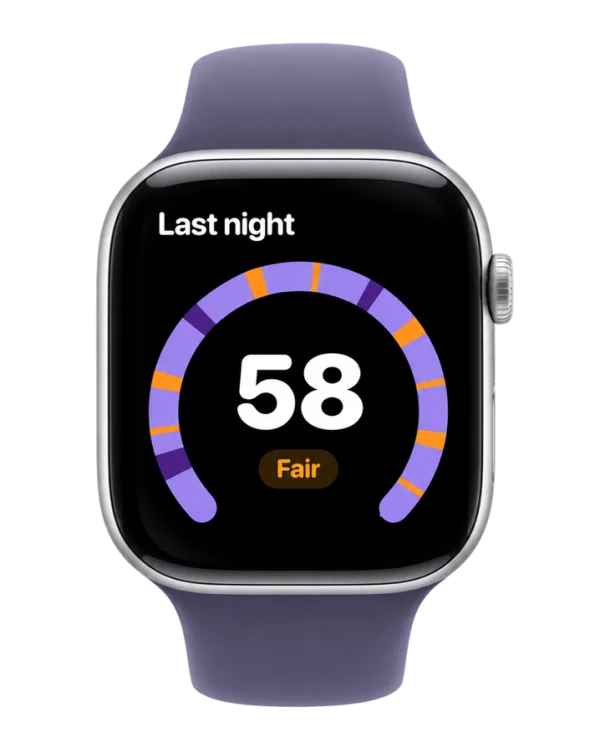
- The arc of your night. A horseshoe from bedtime (a moon) to wake-up (a sun), colored by phase (light sleep, deep sleep, awake), with every wake-up marked in orange. Tap or slide a finger along it to see what happened at any minute.
- Plain words, one thing to try. Wristy, a friendly Apple Watch mascot, explains your night every morning and gives you ONE simple thing to try tonight. Its insights rotate, so you won't read the same advice every day.
- What is likely waking you. Wake-ups are lined up with your wrist temperature (Apple Watch Series 8 or later, and Ultra) or, on other models, with heart rate and sleep stages. For example: you wake twice as often on your warmer nights. That can help if you suspect night sweats.
- Your body vs your usual. Wrist temperature and sleeping heart rate are compared with your own last 30 nights, in words like "Just right" or "A bit warm".
- A score in words first. 0 to 100, but shown as Optimal, Good, Fair or Poor, built from time asleep, deep sleep, REM, efficiency and wake-ups per hour.
- On the watch. Score and Wristy's one-liner, mood in one tap, complications, and a wind-down reminder 45 minutes before your usual bedtime that warns you if the battery is too low to last the night.
- Ask Wristy. A private chat about your own nights, answered on your iPhone with Apple Intelligence (iPhone 15 Pro or newer).
- Privacy. Health data is analyzed on your iPhone and is never sold or shared.
To be clear about what Sleepwrist does not do: no snoring recording, no smart alarm, no sleep sounds, no Android, and no sleep apnea detection. It is a wellness app, not a medical device.
Which one should you choose?
- Choose SleepWatch if you want a free, all-round tracker, sometimes sleep without your watch, or want to record snoring and wake up with a smart alarm.
- Choose Sleepwrist if you are over 40, wake up at night and want to know why, explained simply, with one practical idea each morning.
- Use both if you like: both work with Apple Health, so you can compare.
New to tracking? Start with how to track sleep on Apple Watch, or see how Sleepwrist compares with Welltory.
Frequently asked questions
Is the SleepWatch app free?
Yes. SleepWatch is free to download and use, with an optional Premium Membership. As of October 2026, its App Store description quotes $4.99 a month or $39.99 a year, and some features such as coaching and the smart alarm are Premium.
Does the SleepWatch app for iPhone work without an Apple Watch?
Yes. According to its listing, you can place your iPhone at your bedside and start the app when you go to sleep, or wear your Apple Watch for automatic tracking. Sleepwrist, by contrast, needs an Apple Watch worn to bed.
Does SleepWatch record snoring?
Yes. SleepWatch can record sleep sounds such as snoring and coughing, and rates snoring from minimal to heavy. Sleepwrist does not record sounds.
Is SleepWatch still updated?
Yes. The latest version listed on the US App Store in October 2026 is 8.7.4, released on July 24, 2026.
Which is better for menopause sleep problems?
Both track your nights, but Sleepwrist was designed for women over 40: it focuses on wake-ups, compares your wrist temperature and heart rate with your usual nights, and explains everything in plain words. If night sweats or hot flashes disrupt your sleep often, it is worth talking to your doctor too.
Can SleepWatch or Sleepwrist diagnose sleep apnea?
No. SleepWatch says it is for general wellbeing and is not a substitute for medical care, and Sleepwrist is a wellness app that does not detect sleep apnea. If you snore loudly or wake up gasping, ask your doctor about a sleep test.
Sources
- App Store, SleepWatch - Top Sleep Tracker
- SleepWatch, Find Your Best Sleep
- Apple Support, Track your sleep on Apple Watch and use Sleep on iPhone
- Apple Support, Track your nightly wrist temperature changes with Apple Watch
- Sleep Foundation, Menopause and Sleep
This article is for general information and does not replace advice from your doctor. If your sleep problems last more than a few weeks or come with other symptoms, talk to a healthcare professional.